
In project management, most updates get ignored for one reason: they make the reader work too hard. A busy sponsor wants the signal, not the static.
A strong weekly project status report shows what changed, what may slip, and what needs attention. Think of it like a dashboard light, not a travel diary. If the point is clear in seconds, people keep reading.
Key Takeaways
- Keep weekly status reports short and scannable: focus on RAG status with a plain-English reason, progress tied to milestones, risks with owners and dates, decisions needed, and next week’s actions.
- Use honest status colors like yellow for transparency, avoiding false green to build trust and enable early help from leaders.
- Write in plain language with active verbs and hard nouns; name blockers, owners, and impacts directly to make reports act like a dashboard, not a diary.
- Follow a consistent structure and checklist every week: pull facts from tools, trim non-essential details, write the summary last, and keep it to one screen.
Why most status reports get skimmed
Too many reports sound busy without saying much. They list meetings, repeat task names, and hide the hard part near the bottom. That creates a strange result: the longer the update, the less useful it feels.
Stakeholders usually scan for four things first:
- the current status, and why it changed
- project progress tied to project milestones or deliverables
- risks or blockers with an owner
- decisions needed, with a date
When those items are missing, readers guess. That leads to side chats, follow-up emails, and late surprises.
If someone can’t spot the risk and the ask in 15 seconds, the report is too hard to read.
Another common miss is false green. Everything looks fine until Friday, then the whole page turns red. Honest yellow better reflects true project health than fake green. It provides transparency, which fosters trust and gives leaders time to help.
Short reports also win because they respect the reader’s clock. Atlassian’s guide to project status reports makes the same point in a different way: good updates help teams act. They don’t exist to prove that work happened.
A simple framework you can reuse every week
Use this project status report template’s same bones every time. That way, readers know where to look, and you write faster.
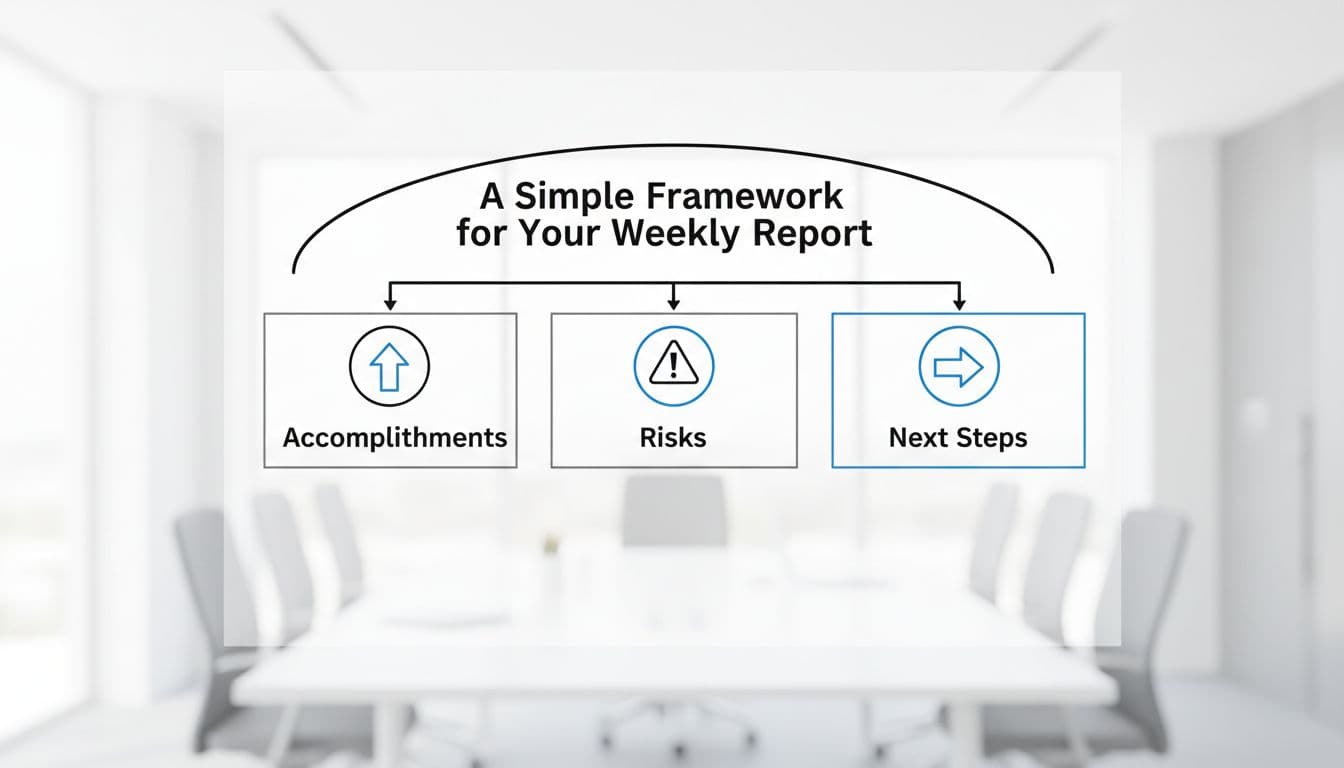
This structure works for internal teams and client updates:
| Section | What to include |
|---|---|
| Overall RAG status | Green, yellow, or red, plus one plain-English reason |
| Progress this week | Two to four outcomes tied to project progress and milestones |
| Risks and blockers | Risks and issues, impact, owner (like the project manager), and target fix date |
| Decisions needed | What you need, from whom, by when |
| Next week | Three to five planned actions |
That is the core. Keep it to one screen or close to it.
To build it each week, follow a simple rhythm:
- Pull facts from your project management software, plan, RAID log, and team notes. Review key areas like project timeline, risk management, and project budget.
- Keep only changes, outcomes, and issues with impact.
- Write the top executive summary last, after the facts are clear.
- Trim every line that doesn’t help a decision.
A good executive summary might read like this: “Status is yellow because vendor sign-off slipped two days, but the launch date is still protected.” That sentence tells the reader what happened and how much to worry.
If you want to compare layouts, TeamGantt’s weekly status report template shows a similar one-page approach. Use it for structure, then make the wording sound like your team.
Write in plain language, not project fog
The best reports use hard nouns and active verbs. “QA finished checkout testing” is stronger than “testing activities are in progress.” “Blocked by security review” is clearer than “pending alignment.”
Use simple lines your reader can act on. For example: “Completed this week: approved wireframes for mobile checkout.” “At risk: data mapping is still incomplete, which may push UAT by three days.” “Decision needed by Thursday: approve contractor hours for cleanup work.”
For internal updates, be direct about the blocker. Name the team, system, or dependency. For client reports, keep the same structure but shift the tone toward business impact. Instead of exposing every internal wobble, write what changed, how it affects timing, and what you’re doing next.
Before you send, scan for this short checklist:
- every risk has an owner
- every action item has a due date
- every progress line shows a result on project deliverables
- every sentence earns its place
If you want a second source to test your format, ProjectManager’s status report checklist is a useful cross-check for any lead project manager. This plain-language approach enhances decision-making and effective communication every week.
Full example of a weekly project status report
Here is a comprehensive project summary you can adapt for email, Slack, or a one-page document:
Project: CRM onboarding rollout
Overall status: Yellow. Build work is on track within project scope and project budget, but data migration is three days behind after a source file error.
Accomplishments this week: The team finished user-role mapping, approved the onboarding workflow, and completed 80 percent of sandbox testing. Sales ops also signed off on field definitions.
Risks and blockers: The source file from the legacy system has duplicate records. This may delay UAT if cleanup isn’t done by Wednesday. Owner: Priya, data lead. Target fix date: April 16.
Decisions needed: Approval from finance by Thursday to use 20 extra contractor hours for data cleanup.
Upcoming tasks: Finish cleanup, restart migration, begin UAT, and confirm training dates with regional managers.
Support needed: Please confirm finance approval and assign one sales manager for UAT by Friday.
Why does this work? Because it moves like a good hallway update from the project manager. It tells the truth, shows project progress, names the blockers, and asks for help with action items without drama. No one has to hunt for the point.
Frequently Asked Questions
What are the key sections in a weekly project status report?
Include overall RAG status with a one-sentence reason, progress this week (2-4 outcomes on milestones), risks and blockers (with impact, owner, and fix date), decisions needed (from whom, by when), and next week’s actions. This structure fits one screen and lets stakeholders scan for signal in seconds. Use it consistently so readers know where to look.
Why do most status reports get ignored?
They bury risks at the bottom, list busywork without outcomes, or hide changes in fluff. Busy readers scan for status shifts, milestone progress, blockers, and asks first—if those aren’t upfront, they guess and follow up elsewhere. Short, honest reports respect time and drive action.
How do you write clear progress and risk lines?
Tie progress to deliverables like “approved wireframes for mobile checkout,” and risks to impact like “data mapping incomplete, may push UAT by three days—owner: Priya, fix by April 16.” Use active verbs and plain nouns; skip vague phrases like “activities in progress.” Every line should help a decision.
Should client reports differ from internal ones?
Keep the same structure but shift tone to business impact for clients: focus on timing changes and next steps without internal details. For teams, name specific teams or systems as blockers. Either way, assign owners, dates, and results to every item.
What tools help build these reports weekly?
Pull from project software, RAID logs, or plans, then use templates like Atlassian’s, TeamGantt’s, or Excel for one-pagers. Write the executive summary last after facts are solid, and scan your checklist: risks owned? Dates set? Progress results-based? This rhythm speeds up future weeks.
Make it easy to read, every single week
A weekly project status report gets read when it is short, honest, and useful. Generate it with a work management tool, an Excel template, or Gantt charts. The format matters, but the real win is clarity.
If your report feels like a diary, cut it back until it reads like a decision note highlighting your status dashboard and key performance indicators. In a crowded inbox, the cleanest update usually gets the fastest response from project stakeholders. Grab a project status report template to streamline your project management routine.
Leave a Reply